
B2B · For business customers only
Custom Retrofitting
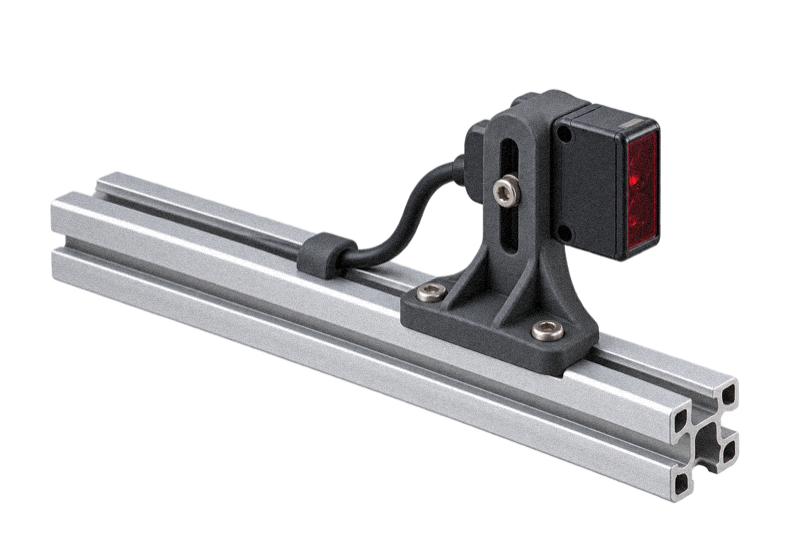
Add a sensor, fit a new tool or adapt a machine to a different task. We make custom brackets, housings, guides and adapters around the equipment you already use.

Focus on the required change

Custom fit around existing equipment

Test before rolling it out
Keep the installation. Change its capability.
Keep the equipment that works and add the parts needed for the next task.
What remains in place
Use the mounting points and space already available. A custom printed component can connect the existing installation to a new sensor, tool or product.
Our team helps consider the surrounding parts, moving cables and access for installation or service.
What the new part enables
Position a sensor, route a cable or guide a new product through an existing machine. Custom geometry fits the change around your installation.
Tell us the improvement you want, such as easier access or a more useful sensor position. We can help work through the component design.
Connect the new function to the existing machine.
A small adapter or revised housing can make an upgrade practical. The shape follows the equipment and the function you want to add.
We produce custom polymer parts with in-house FDM and SLS, with support for material choice and a first fit trial.
Show us the installation and explain the change you need. Our team helps with the next design and production steps.
Tell us what should change
Start with the new sensor, workpiece, cable route or maintenance task. We help turn the idea into a practical component.
Show us the installation
Photos, drawings and models help show the available space and moving equipment. We can discuss any further information needed.
Plan how the part attaches
Our team helps review mounting points, adjustment and access to fixings around the assembly.
Small components. Useful changes.
Explore custom components that add useful functions to existing equipment.
Sensor and camera mounts
Fit a sensor or camera around the available mounting points and field of view, with room for adjustment and cables.
Cable and hose routing
Add guides and supports that route cables or hoses through the existing machine.
Control and electronics housings
House new controls or electronics in a shape that fits the available space and leaves access to connectors.
Adapters and interface plates
Connect a new device to existing fixing points with an adapter shaped around the installation.
Product guides and change parts
Create custom guides and positioning parts for a different product or changeover.
Assembly and maintenance aids
Make tools that help your team position, install or service the upgraded assembly.
We help plan the upgrade around its use.
Fit, material and access all matter. Our team works through these choices with you.
Loads and stability
Tell us what the component supports and whether it moves or vibrates. We help choose the shape, material and print approach.
Temperature and exposure
Nearby heat, cleaners, moisture and sunlight can affect material choice. We help compare suitable options for the installation.
Installation and maintenance
We help consider tool access, removable covers and how the part will be installed or replaced.
System requirements
Share any existing safety or system specification. We help review the printed component, while the equipment team remains responsible for evaluating the complete upgrade.
Try the upgrade. Then plan the rollout.
Start on one installation and use the result to refine the parts before ordering more.

Show us the equipment
Send the information you have, including photographs, drawings or CAD. We help review the fixing points, available space and differences between machine versions.
Fit, test and refine
Try the first part on the equipment. Check its fit, access and function, then share any changes needed for the next version.
Prepare the next installations
Keep the accepted part design and production details ready for the rollout. We can discuss separate variants where equipment differs.
Make the upgrade repeatable
For upgrades across several machines or sites, keep the accepted parts organised by equipment version. It makes the next installation easier to prepare.
Save the prepared items in Digital Inventory so colleagues can find the part, choose a quantity and order another set.
Choose the right version
Clear equipment references help distinguish a repeat order from a different installation.
Order the parts together
Keep the parts and quantities for each upgrade clear, alongside any separately sourced fixings or devices.
Improve from real use
Share feedback from installation and everyday use. We can help review the next version before further production.
B2B · For business customers only
Bring the installation and the idea
We work with business customers on custom equipment parts. Show us the machine and the function you want to add; our team will help with the material and manufacturing approach.
Have CAD ready? Upload it for a quote. Need help with the fit or material? Start with a project discussion.